
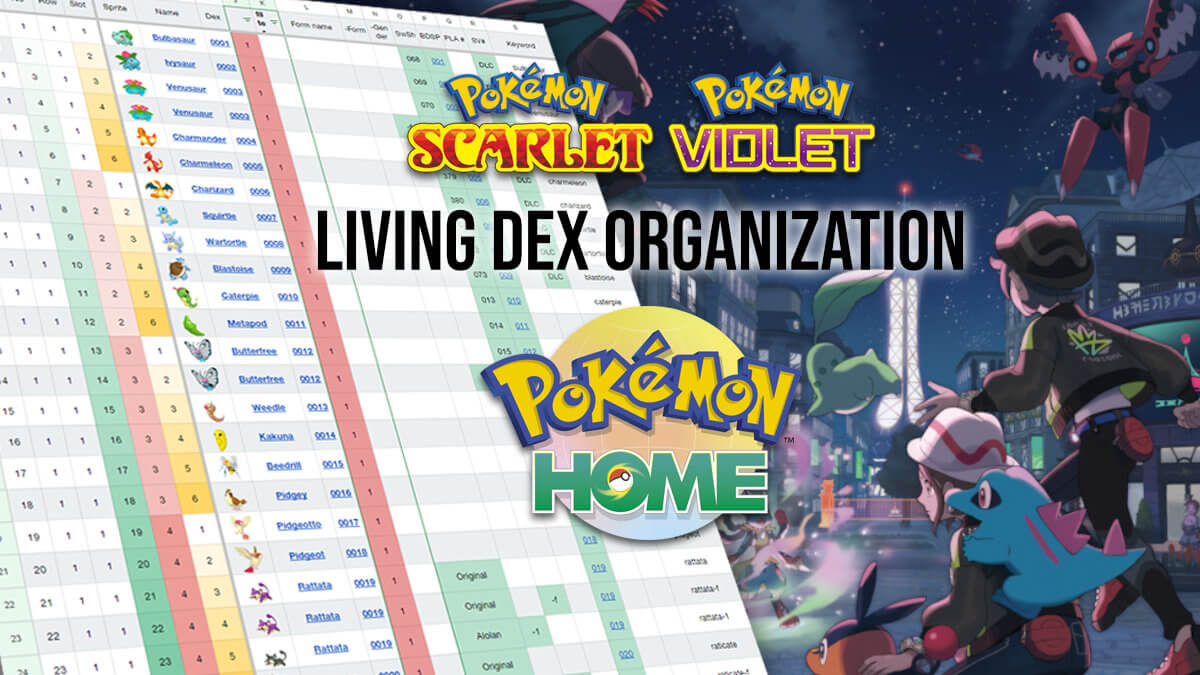
After creating a pasture organization guide for Pokémon Legends: Arceus, YouTuber Austin John Plays has created a guide to efficiently organize and track your Pokémon collection for a Living Dex in Pokémon HOME! We’re helping out by hosting and updating it for players on our website, so read on and get ready to try and get all 1300 + Pokémon and forms!
Update: Pokémon HOME version 4.0.0, which adds support for Pokémon Legends: Z-A and Pokémon Champions, is now live! Read about the update and what it contains here.
How the Living Dex spreadsheet works: Organization and tracking
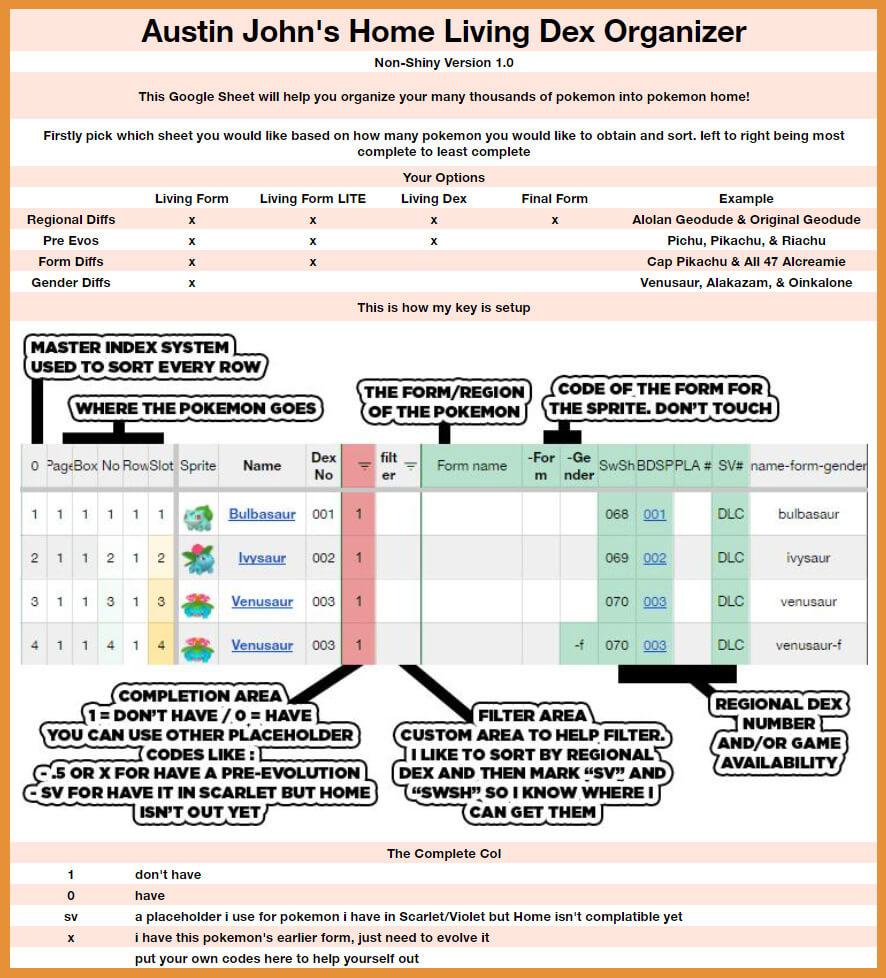
As you can see in the image above, the two versions (Non-Shiny and Shiny) have four methods to create a Living Dex:
- Living Form: Includes regional forms, pre-evolutions, form differences and gender differences
- Living Form Lite: Includes regional forms, pre-evolutions, form differences, but not gender differences
- Living Dex: Includes just regional forms and pre-evolutions
- Final Form: Includes regional forms and all Pokémon at their final evolution
The columns included in the sheet are an aid to players who are looking for the perfection organization, as Box number is listed, along with the Pokémon’s number in that box, its row and its slot within that row. All which are color coded!
You can also use the column after the Dex number to mark down which Pokémon you have found. By default, it is red with a value of “1”, meaning you are in need of 1 copy of the species. You can replace it with “0” when you do not need a species or form anymore and the box will turn white. There are also other codes to help players, listed at the bottom of the image.
Download the Living Dex tracker!
- Download the spreadsheet or spreadsheets you’d like to use below (click the link or right click and choose ‘Save Link As…’) Updated July 7, 2026
- Upload to Google Sheets and start organizing! You can make a free Google account to use Sheets.
- This document will not work in Microsoft Excel or other spreadsheet software!
- Update to a newer version using the built-in importer!
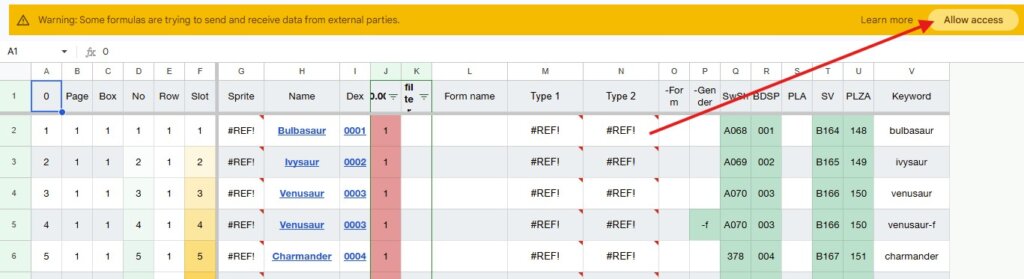
Not seeing images for Pokémon or Types? You may need to allow access to display them since they are hosted outside of the sheet on our servers.
If you have any questions, ask in the comments below or mention “pokejungle” on Twitter and I’ll try to respond or bug Austin about an answer!
Version 1.4 – April 2nd, 2026
- Legends Z-A added. All Vivillion and Gimmighoul forms are supported but some may not be obtainable in-game. Eternal Flower Floette is going to be put in every section because it’s not regular floette and doesn’t follow the same evo line.
Version 1.3.2 – January 11th, 2024
- Fixed Box Numbering on Final Form
- Pecharunt added
Version 1.3.1 – Dec 28th, 2023
- Fixed some errors on pokemon types for females. Fixed column sizes
Version 1.3 – December 27, 2023
- Update For Typings
- Fixed Indigo Disk Paradox Order
- Added Typings for every form of every Pokémon
- Added Scarlet/Violet style Icons for typing – may change serverside later
- Overhauled the Dex availablilty page to be easier to update
- Added more exclusions for regionals and forms in Dex availability
- Fixed Widths, 100px for names, 60 for sprite, 40 for others
- Added Pecharunt’s entry. Icon is locked until event goes live January 11th, 2024
- Import Tool was updated to look for moving Keyword column in older vs newer versions.
Version 1.2 – December 21, 2023
- Update For Indigo Disk
- Removed Dipplin and Duraladon as Final Forms
- Scatterbug facing right (which went unnoticed for YEARS until I tweeted about it) was removed
- Removed Celebi from BDSP
Version 1.1 – September 18, 2023
- Update for Teal Mask support
- NEW FEATURE – added steps to change your tracking version – This allows you to start tracking a different page for your progress.
- BOTH – added all Teak Mask Pokémon & Forms
- BOTH – SV Dex Column (R) tracks 0-400 for Paldea Dex – added K001-K200 for all newly added pokemon. – “I?” was added for likely returning Pokémon in Indigo Disk.
Version 1.0.5 – May 31, 2023
- BOTH – Alolan Diglett + Dugtrio SwSh Dex added
- BOTH – Gourgeist Size Order Fixed
- BOTH – FinalForm dex order for last 6 fixes
- BOTH – Charjabug color fixed
Version 1.0.4 – April 2, 2023
- BOTH – Qwilfish was missing, added. Charjabug & Grubbin were swapped. Living Page box numbers had errors, fixed. Alolan Raichu added as obtainable in SwSh
Version 1..0.3 – March 31, 2023
- BOTH – Importer! Paste your old URL into the field on the IMPORTER page, allow access, and it will auto generate your already marked Pokémon within the same filing system!
- BOTH – Pages Renamed. Codes Fixed. J1 Average Improved. Victini Moved to Gen 5. Typos Fixed. Scatterbug-1 added. Zygarde form names fixed.
Version 1.0.2.1 – March 31, 2023
- BOTH – Very slight Box ordering issue at the end of Gen 1 in Living Dex
Version 1.0.2 – March 30, 2023
- BOTH – Added Gimmieghoul Roaming
- BOTH – New PAGE FF-FormDex. Final Form and Form variations. no pre-evos or genders.
Version 1.0.1 – March 30, 2023
- Normal – Fixed Gen 1 Legendary Box numbers
- BOTH – Added Average in J1 for counter
Version 1.0 – March 27, 2023
- Release
Have you started a Living Dex? Ever wanted to? Let us know what your experience has been with the concept and how far you’ve ever made it if you’ve attempted it before in the comments! Don’t forget to also join our Discord server.
August Giveaway









Was wondering if you were going to add the shiny minion core colors you only have one listed in the living form and I have 3 shiny ones with diff cores I was able to see the core color when they are in the boxes….
They updated that and we can't tell the difference
why are there spots for palkia, dialga and girantinas origin form on the normal one with no image but on the shiny one only girantina has its origin form and there is a image?
If you haven't fixed it: Click on the box where the error is, and you'll get a popup saying you need to approve the use of external images or something (I forget the exact wording). Once you approve it, the images will show up, no problem.
You need to download the newest version. Once you have that downloaded and open you take the old version that you have been working on or updating and copy that URL to the cell B2 in the importer tab on the new version you just downloaded. Once the link is pasted in that cell next to where it says "import link" you have to right click or highlight the B3 cell and where you will see it saying #REF… you need to allow access and the spreadsheet should do the rest for you.
How do I add the sprits
I found a workaround for formulas not working on most of the sheet:
(I have Windows 11 and the Excel program downloaded on my computer)
If you can find a way to download the sheet directly into Google Sheets, you shouldn't have this issue, but if you can only download the sheet as an excel file:
1: Download it onto you computer and open it.
2: If it opens in the Excel program, DO NOT ENABLE EDITING.
3: Copy and paste the tab/tabs of the sheet that you would like to use into a Google Sheet
– Note, doesn't work to keep sprites or the types columns, and the color based on cell input for caught column needs to be redone
This was able to make the sheet usable for me, so if you're having a similar issue this might help you out
If it only works in Google Sheets, why is it an excel file? It should just be a public view-only google sheet that everybody can make a copy of.
Would love to have a Living + Gender version. I think that's the one I'd care about. Not as crazy as all the Forms.
Also, not sure if it would make sense to be included here, but it would be nice to have a tracker for completing the HOME game dex's so that we can get the rewards for completing each games. Like for example being able to track Let's Go mons separately from just "having a pikachu"
There are two Basculin in the Living dex, I think the white stripe form shouldn't be there since it's not a regional form (or is it?)
well clearly you dont update this anymore, but here is a list of things i fixed in the dex sheet
all the ultrabeasts (they dont have dex numbers but are still available in swsh), other legendaries of the same sort. Same to sv technically.
Type: Null
Wyrdeer
Regular Ursaluna is unavailable in scarlet violet
generally the hisuian FORMS are not available in sv (excluding growlithe/arcanine)
Pecharunt
zarude is not available
bonus:
zeraora doesnt have a bulbapedia link (at least in livingform)
depending on how you might want to count the new home shinies for the shiny sheet
there are probably more that i either forgot to write down or didnt find.
Hopefully you fix these when you update for za
hopefully you update for za at all….
I doubt this will be updated until ZA comes out but I found one very minor mistake.
The Mr. Mime line (Mime Jr, Mr. Mime, Mr. Rime) use their Crown Tundra pokedex number instead of their SwSh dex number (Mr. Mime is listed as C011 instead of 365, etc). They are the only pokemon that do this (at least for Galar) so I presume its an minor oversight.
how to get images to show up
Any plans for this to be updated for ZA and the DLC?
I want to ask the same (details like eternal flower floette in living form dex). Also, it would be good if battle bond greninja was a separate form than regular greninja in living form dex (as both are treated differently and can't be converted to one another)
I want to ask the same (details like eternal flower floette in living form dex). Also, it would be good if battle bond greninja was a separate form than regular greninja in living form dex (as both are treated differently and can't be converted to one another)
Just a heads up the FinalFormForm and FinalForm tabs are both missing Mankey and Primeape.
Hey Clint, sorry for the late reply, Annihilape is now the final stage of the evolution line and is included on the sheet 🙂
I just downloaded the newest version to use and im not getting any of the pictures or other data.
Did you make sure to hit ‘Allow Access’ on the yellow bar when you open it in Google Sheets? If you did and still aren’t seeing them, feel free to hop into our Discord server and ping me and we can troubleshoot further
I downloaded it but wanted it to help organize my boxes with having both a non-shiny and shiny form, as well as additional one for all mega’s (to be able to have regular and mega in Champions) I am editing the spreadsheet now with formulas to help it be more customizable if anyone wants it!
So I may have missed the info in the video John released recently but I’m wondering: is it possible to have both the regular and shiny organizers on one sheet?
It may be possible to meld the sheets but I don’t think there will be an officially released combined version because the bottom tabs become more confusing and box layout in HOME shifts
If it is possible to meld the sheets, I don’t know how. I don’t know how to use sheets to begin with.
The quick and dirty way would be to download and open both copies in Sheets then do the following:
– In the non-shiny org add a new sheet (+ button in bottom left) named “Shiny”
– Copy all the data from the “Shiny” tab in the Shiny organizer into the new sheet
– Add new columns for sprites and tracking wherever you like in your choice of list (I added a K and L for example)
– in the first box type or copy/paste this =ifna(VLookup(X2,Shiny!B:C, 2, 0),””) and hit enter. (note that the “X” will be the Keyword column in the list, Shiny is the sheet referenced, then B:C are the Keyword and Sprite columns in said sheet)
– while the box with the new sprite is selected there should also be a little dot in the bottom right of the box, click+hold that dot and drag it to the bottom to autofill the rest
– if you care about the percentage tracking you can copy everything from the tracking column to the shiny tracking column you made.
I don’t know if this messes with the individual lists in any way or how the importer likes it, but it works for me. Could also just add the shiny sprite list to the regular sprite reference sheet and have the “look up” check the shiny sprite column but that’s about the same amount of work. It’s definitely doable to meld them.
Im not getting any of the regional form pictures up, but everything else works as intended. I have allowed access and it showed all the normal pictures but not alolan/galarian etc.
Is it a problem on my end or the site storing the images where its pulled from?
All the images are stored on my site — just checked in my own sheet and images are loading for me. Can you hop into our discord and go to the #help-and-support channel and we can troubleshoot?
Hi! I managed to fix it myself but wanna leave the answer here if anyone else need it.
I had to change the language/localization of the file like this:
In a Sheets file, go to the menu:
File > Settings
Select your preferred “Locale”.
Note that here you will also see which “Display language” is currently enabled, with a clickable link to your account Language settings.
When trying to start using this, the hyperlinks seem to cause a glitch visually where both the text of the Pokemon and the link are visible, causing the text to be unreadable while using the sheet. This is the case both on my Chromebook and on my Android phone. Is there any fixes?
That is odd, have not heard of that happening. If you could provide a screenshot in our Discord’s #Help channel that would be great and we can see what might be happening
Apologies for the potentially very dumb question, but how does this form translate to Pokemon Home itself to organize it?
I would be usefull to add a sheet for Alpha pokemons